Your Cart is Empty


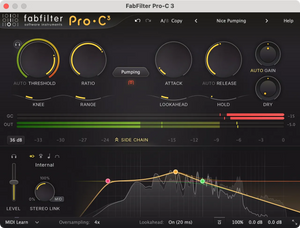
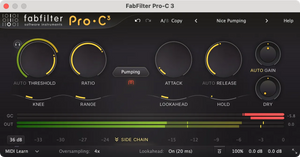
Professional compressor plug-in
View other products by FabFilter

Incredible sound and character
FabFilter Pro-C 3 is a high-quality compressor plug-in for the most demanding engineers. Whether you need subtle mastering compression, an upfront lead vocal, that magic drum glue or deep EDM pumping: Pro-C 3 gets the job done with style.
Everything you need
Pro-C 3 offers 14 different, program-dependent compression styles and various character modes to introduce smooth saturation, vintage color and analog drift. But there's more! You also get full immersive / Dolby Atmos® functionality (up to 9.1.6), up to 32x oversampling, unique auto-threshold, intelligent auto-gain and auto-release, a variable knee and hold, smooth lookahead external side-chain and host tempo sync triggering, variable stereo linking and mid/side processing, all packed in a beautifully designed user interface.
Beautiful interface and optimized workflow
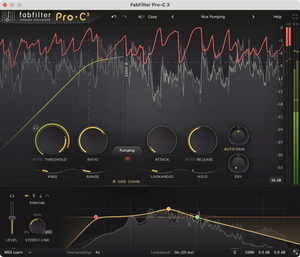
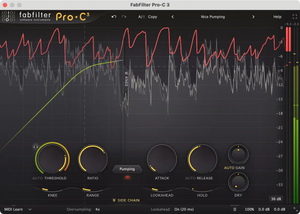
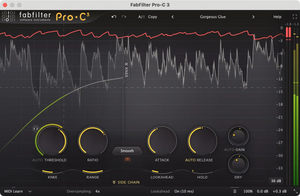
The fully redesigned interface in FabFilter Pro-C 3 offers insightful metering with real-time displays that will greatly improve workflow. The large animated level/knee display visualizes exactly when, why and how compression is applied to incoming audio. Accurate level meters show the exact peak and loudness values, while the circular side-chain input meter turns finding the perfect threshold setting into a trivial task. And the large side-chain EQ controller makes it easier than ever to filter the trigger signal any way you like.
FabFilter goodies
Of course, you also get all the usual FabFilter goodies: perfectly tuned knobs, a modern preset browser to easily navigate the carefully designed factory presets, interactive MIDI Learn, undo/redo and A/B switch, Smart Parameter Interpolation for smooth parameter transitions, an extensive help file with interactive help hints, sample-accurate automation, advanced optimization and much more.
Instance List
A modular channel strip
Control all of your Pro-Q 4, Pro-C 3, Pro-DS and Pro-G instances in one convenient overview: the instance list in Pro-Q 4.
You will discover this to be a huge time-saver, making it much easier to dial in initial settings for all plug-ins when starting your mix session.
Character and coloration
Drive your sound
The new character panel brings Pro-C 3 to life through carefully designed analog saturation, coloring and drift, including customizable drive and pre/post-compression routing settings.
Pro-C 3's style and character options let you combine a wide range of compressor flavors with different types of analog coloring. With Pro-C 3, you don't just get one compressor, you get dozens!
Side Chain
In-depth side chaining
Add up to 6 EQ bands with all shapes from Pro-Q 4, including all-pass and brickwall filters. Optionally, bands can only target the mid- or side signal.
You can also choose to let the compressor trigger on the external side chain signal, MIDI or to a host-tempo-synched pulse.
Last but not least, Pro-C 3 offers variable channel linking, including M/S processing.
Key features
Fourteen different compression styles, of which six are new in version 3: Versatile, Smooth, Vari-Mu, El-Op, Upward and TTM (To The Max)
Gorgeous Retina interface, with (optional) animated level knee displays and accurate peak/loudness metering
Character modes: carefully designed analog saturation, coloring and drift bring Pro-C 3 to life with customizable Drive and Pre/Post-compression routing settings
Full Screen mode, offering a large level display and side-chain EQ controller
Introducing host tempo triggering, with customizable sync, offset and pulse length settings
Auto Threshold: Make the threshold knob level-independent — very useful for dialog processing
Pro-C 3 instances can now be controlled via the Instance List in Pro-Q 4, together with Pro-G and Pro-DS
Full immersive / Dolby Atmos® functionality (up to 9.1.6), with customizable channel/stereo linking
Mix setting, which scales the gain change from 0% to 200%
Side-chain EQ section: add or remove up to 6 bands of any shapes, including brickwall or all-pass filters, and mid- or side-only EQ'ing per band
New-style preset browser, with easy search, tags and meta data
Accurate, large level and gain change meters, with peak and loudness level visualization (complying with the Momentary mode of the EBU R128 / ITU-R 1770 standards)
Up to 32x oversampling
Program-dependent attack and release curves
Smooth lookahead (optional, up to 20 ms), now with a customizable maximum between 0 and 20 ms, to finetune latency versus needed lookahead
Retina support on macOS and High DPI support on Windows
Intelligent Auto Gain
External side chain triggering
Hold (up to 500 ms)
GPU-powered graphics acceleration
Custom knee, variable from hard knee to a 72 dB soft knee (to enable saturation-like effects)
Auto Release
Optional MIDI triggering
Super-fast attack times
Supports common Pro Tools hardware control surfaces
MIDI Learn
Variable stereo linking and mid/side processing, with mid-only, side-only, Mid-to-side and Side-to-Mid processing
Range setting, which limits the maximum applied gain change
Undo/redo and A/B comparison
Audition Triggering option, which enables users to hear on which parts of the audio Pro-C 3 is triggering and how much compression is taking place
Smart Parameter Interpolation
Multiple interface sizes: Compact, Small, Medium and Large
Sample-accurate automation of all parameters
Extensive help file with interactive help hints
Available in VST, VST3, Audio Units, CLAP, AAX Native and AudioSuite formats (all both 64-bit and 32-bit)
Plug-in formats
All FabFilter plug-ins are available in VST, VST3, Audio Units, CLAP, AAX Native and AudioSuite formats.
Windows
macOS